
EDAForce Inc
PCB Footprint Expert Enterprise
Need to save time when building your parts?
Well how about saving 95% on building new parts and 99% on rebuilding entire libraries!
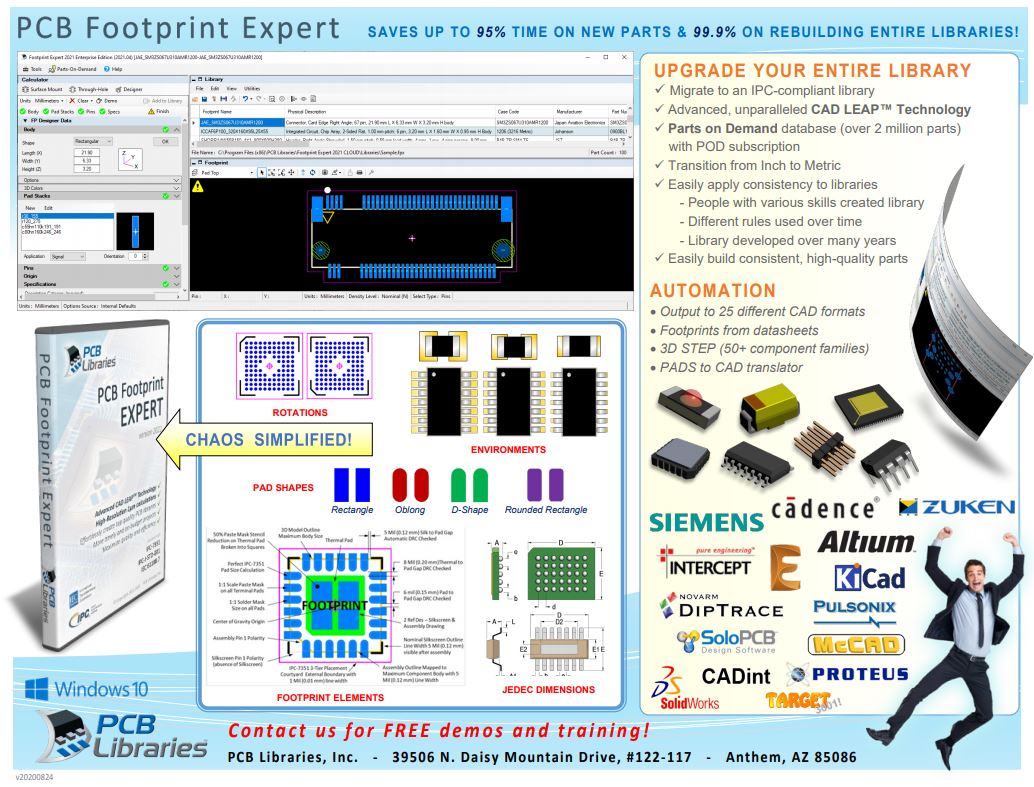


 Modify any of hundreds of preferences and rebuild your entire library in seconds.
- Units (Mils, Micrometers, Inches and Millimeters)
- Pad Shape (Rectangle or Rounded, Oblong, D-Shape, Square)
- Rotation (Pin 1 Up, Left, Right or Down)
- Origin (Centric or Pin 1)
- Environment Level (Least, Nominal, Most, User)
- Silkscreen Line Width and Pad to Silkscreen clearance
- Minimum Pad to Pad Gap or Pad to Thermal Pad Gap
- Paste Mask Reduction for Thermal Pads
- Solder Mask Swell or Solder Mask Defined Pads
- Map Silkscreen and Assembly Outlines to Nominal or Maximum Component Body
MANAGE
 Central repository of PCB library data.
Easily manage all library data, created by different people with different skills and tendencies, in a central location on your network. All have easy access to browse, search, and quality control the data files with the FREE Footprint Expert.
MAINTAIN
 Accurate library data at your fingertips.
Add new component package and logic data to your database in a snap! Sort data by any attribute field – predefined or custom-made! Or just leave the data organized in one of dozens of component families.
 Quickly become an expert at PCB libraries.
Regardless your skill level, with PCB Libraries is backing you up, you create high-quality PCB libraries that look like were created by professionals with decades of experience. Well, in a sense – they were!
MICRO/MACRO FOCUS
 Establish specific library parameters across division.
Regardless your management requirements, you can easily establish and adjust constraints on rules and preferences so everybody builds consistent quality parts that look like were created by a single professional designer.
MIGRATE
 Migrate libraries to a different CAD format much faster.
The PCB Footprint Expert interfaces with popular CAD tools. Need your libraries in a different CAD format? Open the “master” library in the Footprint Expert and export!
MAXIMIZE
 Max-out both quality and efficiency.
If you dare, the Footprint Expert promises to help you maximize both. That’s right – you don’t have to increase one at the cost of the other.
MONETARY BENEFITS
 A solution that pays for itself, often after 2 or 3 projects!
PCB Footprint Expert creates PCB library parts in a fraction of the time compared with manual editing. There are many elements that go into the creation of a high quality library part and the PCB Footprint Expert auto-calculates and generates everything down to the finest details.
MANUFACTURE
 Minimize cost of manufacture.
By creating high quality designs the first time, you reduce the work and costs associated with design re-spins.
Footprint Expert (Enterprise);
The Footprint Expert Enterprise includes the full range of functions for professional PAD designers, CAD librarians and EE engineers who are responsible for the construction, maintenance and further development of the corporate PCB library. This includes the documentation that company-specific user Option settings and compliance with the IPC-7351 Guideline and IPC-J-STD-001 solder joint goals and IEC 66881-7 Zero Component Orientation. The creation of Standard footprints are simply data entry of package dimensions and output to your CAD tool. The creation of Non-standard footprints uses advanced features for pad stack creation and placement. The Enterprise version supports 24 CAD tools and 3D STEP. Each CAD tool interface is sold separately. The Enterprise can be purchased or leased for 20% of the list price. Get a Free 30-day trial license today!
Footprint Expert Pro);
The Free Footprint Expert Pro has all the features of the Enterprise, but only supports 12 CAD tool outputs:
CADint, DesignSpark, DipTrace, Eagle, KiCad, Pantheon, Proteus, Pulsonix, McCAD, SoloPCB, Target 3001!, Ultiboard
Download the Free Footprint Expert Pro here –  www.pcblibraries.com/downloads
Footprint Expert (Viewer);
The Free Viewer is intended for Enterprise and Pro users to share their PCB library data with their co-workers and customers. The Viewer allows anyone to see all the features in your PCB library.
Footprint Expert (POD Builder);
The POD Builder is available for Free download, but it is 100% dependent on purchasing parts from the Parts on Demand (POD) database. The POD Builder supports 24 CAD tools and has 3D STEP output. The concept is Free software but purchase all the parts you need. $1 for Standard packages and $2 for Non-standard package.
Download the Free Footprint Expert POD Builder here – www.pcblibraries.com/POD
3D Step;
The Footprint Expert Enterprise created with the optional CAD output " 3D STEP automatically 3D models".
In conjunction with the Footprint Expert Enterprise and 3D STEP, you can create landing surfaces and 3D models at the same time with a single click. The 3D STEP model links the zero point with the rotation of the FPX footprints. Define different colors for various component parts (body, connecting wires, LED, etc.). There are 50+ "Surface Mount" - and "Through Hole" -component family supported (created by the footprint designer non-standard footprints are displayed as 3D envelope).
The Enterprise version supports high quality 3D STEP output for 144 standard surface mount and through-hole component families. The feature is sold separately.
PCBPOD;
You can also purchase a yearly subscription to Parts on Demand (POD) for $120 a year that allows you to download any footprint you need from a database of over 3-million-part numbers. If you can’t find the part number you need on POD, you can order the footprint for as little as $5 for standard parts and $10 for non-standard parts.
Comparison Table of different Versions;
Footprint Expert - Version Comparison
24 CAD Output;
CAD OUTPUTS;
- Altium Designer
- Altium P-CAD
- Cadence Allegro
- Cadence OrCAD PCB
- Cadence OrCAD Layout
- CADint
- CadSoft EAGLE
- DesignSpark
- DownStream SoloPCB
- IB Friedrich TARGET 3001!
- Intercept Technology Pantheon
- KiCad
- Labcenter Proteus
- Mentor Board Station
- Mentor Expedition
- Mentor PADS Professional
- Mentor PADS Layout
- National Instruments Ultiboard
- Novarm DipTrace
- Westdev Pulsonix
- VAMP McCAD
- Zuken CADSTAR
- Zuken CR-5000
- 3D Step
POD Credits;
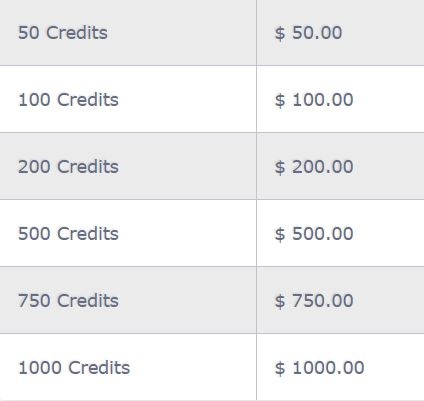
POD Credits can be purchased via credit card via the registered PCB account. These credits are credited to the desired USB key, do not run out, are not transferable and can not be replaced or returned. PCB Library has a P.O.D (Parts on Demand) Database with over 1 Million + components. All existing parts are for PCB Footprint Expert Enterprise version FREE available (download limited to a maximum of 25 parts / day. But all new components will have a cost and can be purchased via POD credits.
You may purchase all the Credits you want, as they will never expire.

BOM Builder Services
Our BOM Builder service is a complimentary part building service that really can shave days off every PCB design! By taking advantage of this anytime (24/7) service, you no longer need to waste time to search online for library data, or worse - build libraries yourself!
WHO IS ELIGIBLE?
Footprint Expert Enterprise customers with the latest version.
We provide parts in FPX format to take full advantage of our cutting-edge CAD LEAPTMTechnology (Libraries Enhanced with Automated Preferences).
GET STARTED!
Send us your BOM (Part Number and respective Manufacturer Name), and we will:
- Extract all existing parts from our database
- Add all missing data (logical description, datasheet links, etc)
- Build standard parts for $5/part
- Send you the completed BOM with summary of all built parts
All new parts get added to the master P.O.D library database for future availability.
Our target turnaround time is within 24 hours. This BOM Builder service is provided on a first come, first served basis.
We continue to build standard parts for free, if the appropriate Case Code, Logical Description and Datasheet Link is provided for each part.
NOTE: the paid/purchased service takes priority over the free service, contact us to determine if/when the free service is available.
Note: Prices for this service are subject to change - all published prices are applicable and guaranteed only for BOMs in queue, or as otherwise individually quoted by Sales. Changes to prices will be applicable only to new BOMs which are not in queue at time of change.
http://www.pcblibraries.com/products/fpx/userguide/